Large PRs often start small. A ten-line change can quickly grow into a hundred-line refactor as unexpected dependencies and additional requirements emerge. When that happens, splitting the work into smaller, focused PRs makes each change easier to understand and review.
Note
In this article I will be covering the cherry-picking 🍒 method for breaking up a large PR, but please note there are multiple other ways to achieve the same outcome that could be more efficient depending on the circumstance.
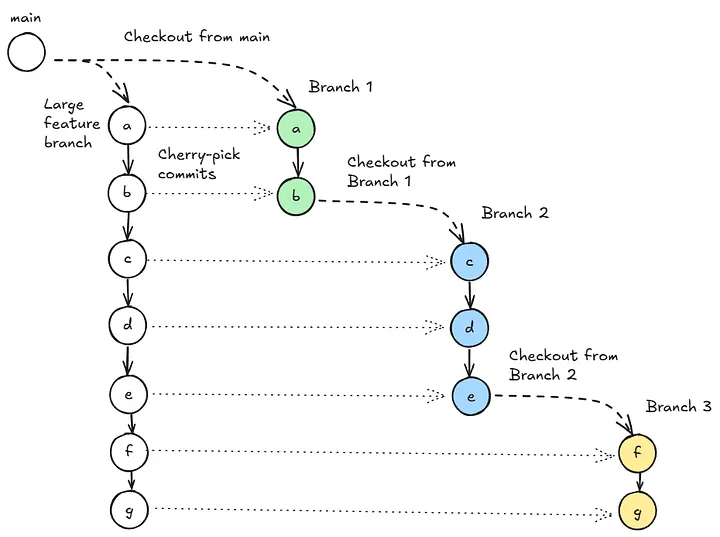
1. Checkout the main branch
git checkout main2. Plan your commit splits
Decide how many splits you need and which commits will belong to each PR. You can list the commits that are ahead of your default branch (usually main):
# Get the list of commits ahead of main in feature-branch-large-pr
git log --oneline origin/main..feature-branch-large-pr
3. Create a New Branch for the First PR
From main, create a new branch that will hold the first set of commits:
git checkout -b branch-14. Cherry-Pick the Desired Commits
Pick the commits that belong to this first PR.
git cherry-pick <commit1> <commit2> <commit3>Commits added on top of main on your branch should look like the following:

5. Create the Next PR Branch
Once the first PR branch is ready, branch off from it to start the next part:
git checkout -b branch-26. Cherry-Pick the Next Set of Commits
On branch-2, cherry-pick the subsequent commits from the large branch that you want in this PR. Resolve any conflicts as needed:
git cherry-pick <commit4> <commit5>Commits added on top of main on your branch should look like the following:
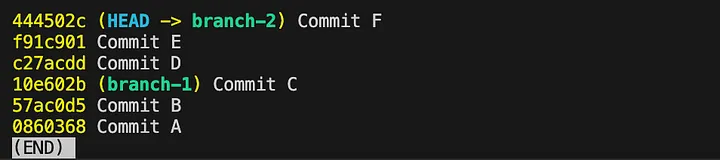
7. Repeat Until Complete
Continue this process, branching off from the previous part and cherry-picking the next commits until you’ve covered all the commits from feature-branch-large-pr.
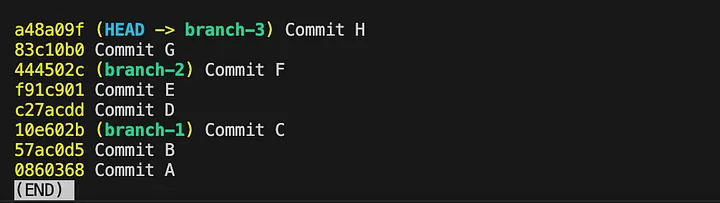
8. Push the Stacked PRs to remote repository
git push origin branch-1 branch-2 branch-3